


GPU Acceleration
GPU acceleration for Linux in the Andronix app - what it does, the full-screen zero-copy path, the devices it's been tested on, how to check it's on, how to turn it off, and what to report.
GPU acceleration lets OpenGL programs in Linux draw with your device's graphics chip instead of the processor. It's experimental and off by default. Please try it and tell us how it goes.
What it does
- OpenGL programs can run faster: 3D apps, games and benchmarks like
glmark2. Linux's OpenGL (Mesa) passes the drawing to your device's graphics driver through VirGL. - The desktop itself doesn't change much. XFCE doesn't draw with OpenGL, so don't expect the desktop to feel faster.
- On fast devices, software drawing can be quicker. Try both and keep what works better for you.
Full-screen zero-copy
When an OpenGL program's window fills the whole Linux screen, such as a full-screen game or video, Andronix can show its picture without copying it first. This is called zero-copy.
- It's on by default.
- It has no switch of its own. It works only while GPU acceleration is on, and only for a window exactly the size of the screen.
- Normal windows and the rest of the desktop use the regular path.
- Nothing on screen shows when zero-copy is in use.
Turn it on
Open Settings › Linux and switch on GPU acceleration (marked Experimental). It applies to every distro in the app, from the next time a desktop starts: stop the desktop and open it again.
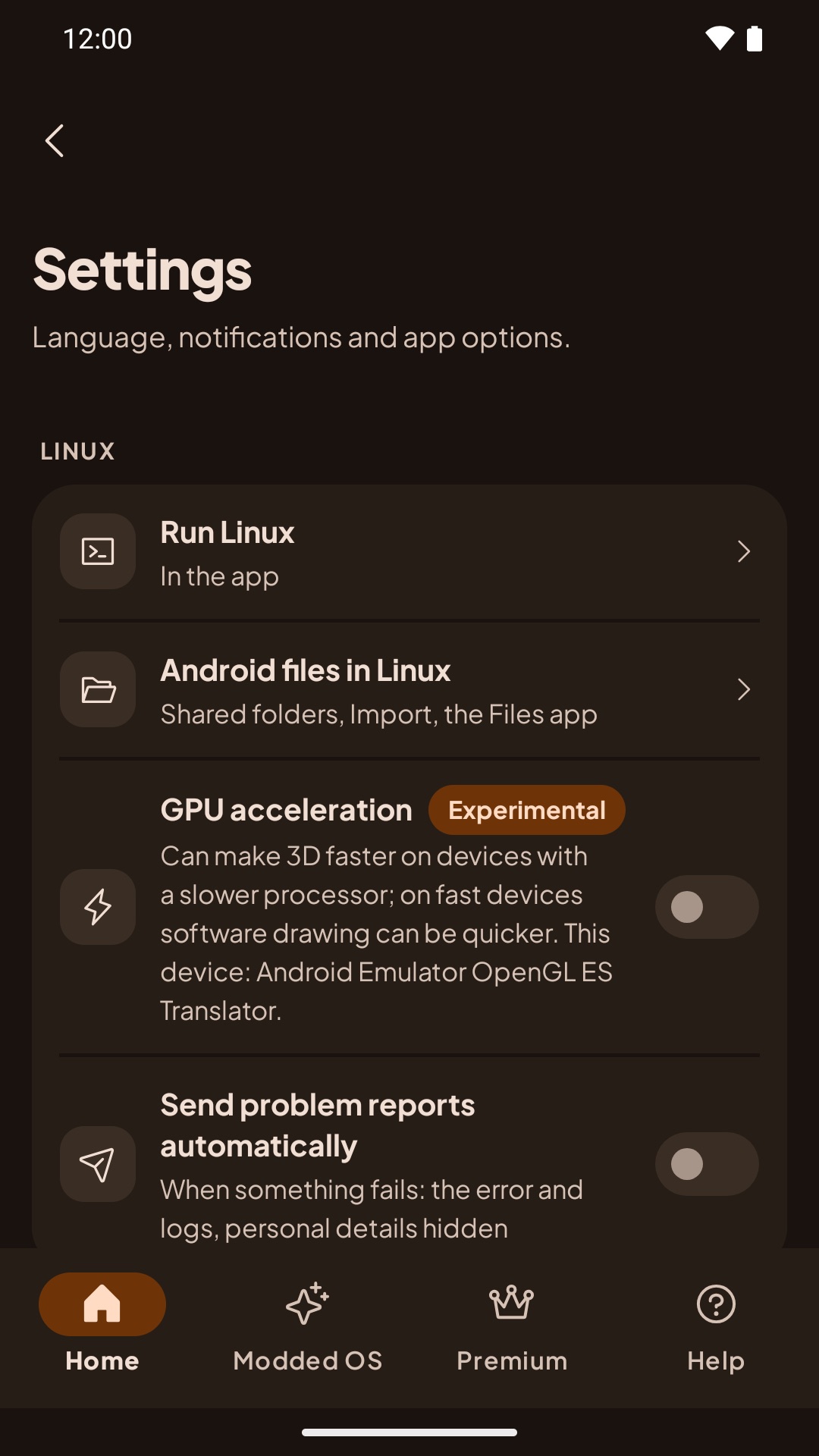
The row's caption ends with your device's graphics chip, for example "This device: Adreno 740." It shows the chip whether the switch is on or off, so it doesn't tell you whether acceleration is working.
Which devices it works on
GPU acceleration needs Android 8 or newer, like the rest of Linux in the app. There's no list of supported chips: it works wherever VirGL runs on the device's graphics driver.
We've tested it on:
| Device | Graphics | Android |
|---|---|---|
| Pixel 4a | Adreno 618 | 11 |
| Pixel 8 | Mali-G715 | 15 |
| Galaxy A15 | Mali-G57 MC2 | 14 |
| Galaxy S24 Ultra | Adreno 750 | 14 |
Not tested yet: Xclipse, PowerVR, other Adreno and Mali models, and Android 8 to 10. Reports from these devices help most.
If your device's graphics driver can't run it, Linux draws in software instead, by itself.
Check that it's on
In a Linux terminal, install mesa-utils (for example sudo apt install mesa-utils on Debian and Ubuntu), then run:
glxgears -info | grep GL_RENDERER- With GPU acceleration:
GL_RENDERER = virgl (...), with your chip in the brackets. - Without it (software drawing):
llvmpipe ....
glxinfo may stop with BadMatch (X_GetImage). That is a quirk of how the desktop shows GPU frames, not a problem with the GPU. To check the GPU, run glxgears; it shows the frame rate. Both glxinfo and glxgears come from the mesa-utils package (sudo apt install mesa-utils).Measured results
glmark2 scores (5 scenes, median of 3 runs; higher is better), measured on AWS Device Farm with test builds that have the same GPU code as the 10.1 betas, not the app from Google Play itself.
In an 800x600 window:
| Device | GPU acceleration | Software |
|---|---|---|
| Pixel 4a | 102 | 75 |
| Pixel 8 | 70 | 65 |
| Galaxy A15 | 51 | 36 |
| Galaxy S24 Ultra | 191 | 178 |
Full screen, with and without zero-copy:
| Device | GPU, zero-copy | GPU, without zero-copy | Software |
|---|---|---|---|
| Pixel 4a | 74 | 64 | 40 |
| Pixel 8 | 81 | 55 | 50 |
| Galaxy A15 | 51 | 43 | 30 |
| Galaxy S24 Ultra | 211 | 153 | 120 |
If something looks wrong
Turn it off: Settings › Linux › GPU acceleration, then stop the desktop and open it again. Linux goes back to software drawing. There's no separate switch for zero-copy.
If the desktop stays black with GPU acceleration on, Andronix turns it off by itself, restarts the desktop with software drawing, and tells you:
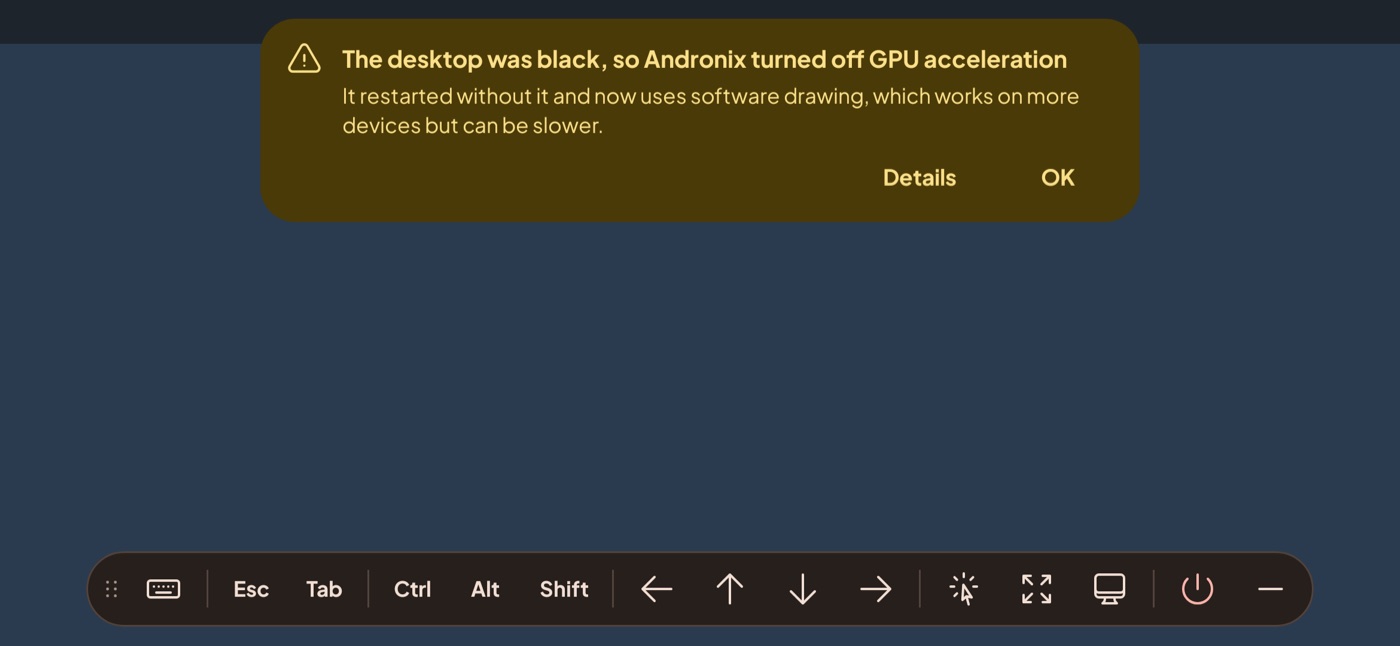
The setting's caption then reads "Turned off after a black screen. Turn it on to try again." More: Black screen and safe mode.
What to report
Glitches, crashes, a black desktop, or a program that's slower with GPU acceleration: please tell us.
- After a black screen: tap Details, then Report a problem. The report already says the desktop was black with GPU acceleration.
- Anything else: in the app, open Report a problem and choose Desktop, Termux:X11 or sound.
Reports don't include GPU details by themselves, so please write:
- your device model;
- whether GPU acceleration was on or off;
- the
GL_RENDERERline fromglxgears -info; - the program and what went wrong (a screenshot helps).
For other problems, see Linux in the app: limits and problems.